
How to Create a myNSFAS Account
If you want to apply for funding from the National Student Financial Aid Scheme (NSFAS), the first step is to create your own myNSFAS account. This account serves as your personal profile, where you can submit your application, track your NSFAS status, and manage all updates about your funding. Without registering, you won’t be able to apply online or receive updates about your application.
Why You Need a myNSFAS Account
A myNSFAS account is more than just a login. It is the official gateway between students and NSFAS. Once your account is set up, you will be able to:
-
Apply for financial aid online.
-
Check your NSFAS application status.
-
Update personal and academic information.
-
View communications and important notifications.
-
Upload required supporting documents.
Step-by-Step Guide: Creating Your myNSFAS Account
Follow these steps carefully to register your account:
Visit the Official NSFAS Website
-
Go to www.nsfas.org.za for login.
-
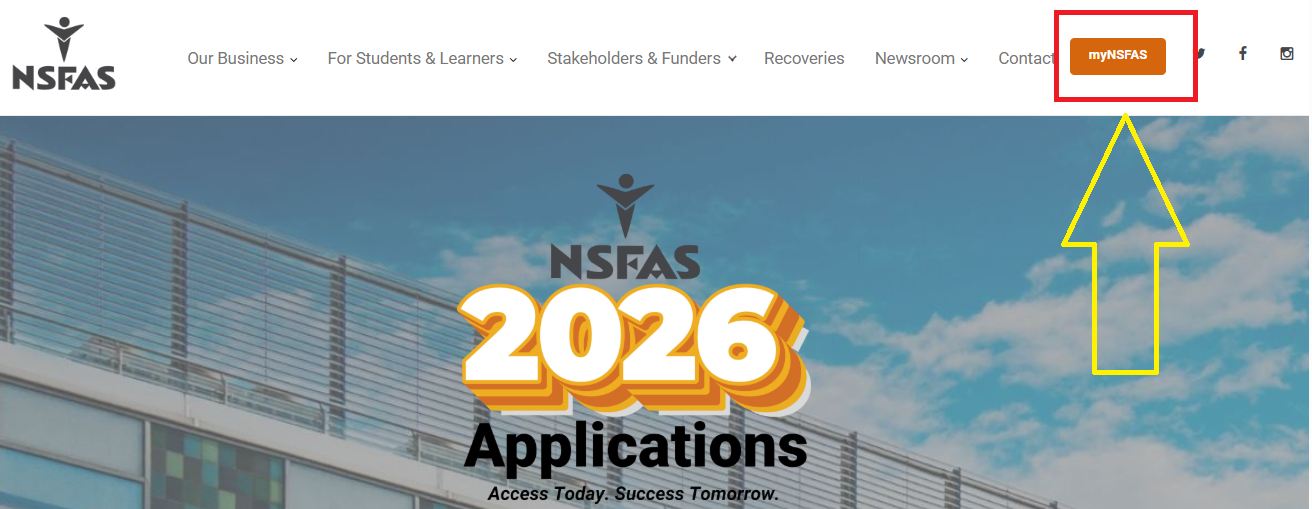
Click on the “myNSFAS” tab at the top of the homepage.
Click on ‘Create Account’
-
Select the “Register” or “Create Account” option.
Enter Your Personal Information
-
Provide your ID number, full name, and surname exactly as they appear on your ID document.
Provide Contact Details
-
Enter your email address and cellphone number.
-
Make sure these are correct, as NSFAS will use them to send you updates and OTP codes.
Set Your Login Credentials
-
Create a strong password (at least 8 characters, mix of letters, numbers, and symbols).
-
Re-enter the password to confirm.
Verify Your Details
-
You will receive a One-Time Pin (OTP) via SMS and email.
-
Enter the OTP on the website to confirm your registration.
Final Confirmation
-
Once your account is verified, you can log in anytime with your username and password.
Common Issues When Creating an Account
-
Invalid ID number error: Double-check that you typed your ID exactly as it appears.
-
OTP not received: Check both SMS and email. Sometimes, it takes a few minutes.
-
Duplicate registration: If you already created an account in the past, try “Reset NSFAS Password” instead of registering again.
Creating a myNSFAS account is the first step to applying for financial aid in South Africa. As long as you meet the age requirements (18–35 years) and have the necessary documents, the registration process is simple and quick. With your account ready, you can apply, monitor your NSFAS status, and receive important updates without delay.
What is a myNSFAS account used for?
A myNSFAS account is your personal online profile where you apply for funding, upload documents, and track your NSFAS application status.
Can I create a myNSFAS account without an ID?
No. A valid South African ID number is required. If you are under 18, you may use your birth certificate with parental or guardian details.
Is there an age limit for NSFAS applications?
Yes. Generally, NSFAS only funds students between 18 and 35 years old, with certain exceptions for students with disabilities.
What documents do I need to create a myNSFAS account?
You need your South African ID or birth certificate, a valid cellphone number, a working email address, and supporting financial or guardian documents.
Can I have more than one myNSFAS account?
No. Each student can only have one account linked to their ID number. Duplicate accounts may cause application delays.
What should I do if I forget my myNSFAS password?
Click on “Forgot Password” on the login page and reset it using your registered cellphone number or email address.
How do I know if my myNSFAS account is verified?
After registration, NSFAS will send you a One Time Pin (OTP) via SMS or email. Once entered, your account will be verified and ready for use.
Can I update my email or phone number after creating my account?
Yes. You can log in and update your personal details at any time. Always keep them current to receive NSFAS notifications.
Do I need a myNSFAS account to check my application status?
Yes. Your NSFAS status is only available when you log in to your registered account.
What should I do if I can’t log in to myNSFAS account?
First, try resetting your password. If the issue persists, contact NSFAS support via the official website or their toll-free number for assistance.

- NSFAS Fraud Warning: How to Spot NSFAS Scams - September 28, 2026
- NSFAS Allowances Explained - September 28, 2026
- NSFAS Contact Details - September 26, 2026