
NSFAS Fraud Warning: How to Spot NSFAS Scams
NSFAS fraud can target students through fake agents, social media posts, emails, WhatsApp messages, phone calls, and fake websites. The NSFAS Fraud Warning: How to Spot NSFAS Scams starts with a simple rule: NSFAS applications are free, and no person can pay to influence a funding decision. NSFAS also warns students never to share their password or one-time PIN with another person.
Students should check requests for money, login details, banking information, or OTPs before taking action. A message may use NSFAS branding and still have no connection with the real organisation.
Common NSFAS Scams Students May Face
Scammers use different methods to target NSFAS applicants and beneficiaries. Some promise faster approval, funding changes, or access to allowances in exchange for money.
Common warning signs are:
- A person asks for money to submit an NSFAS application.
- Someone promises guaranteed NSFAS funding for a fee.
- A person asks for your myNSFAS password.
- Someone requests your OTP or one-time PIN.
- A message asks you to open an unfamiliar login link.
- A fake agent offers to change your application result.
- Someone asks for banking details through an unverified channel.
- A social media account claims to represent NSFAS without proof.
- A person asks for payment to speed up an appeal.
- A message creates pressure and demands an immediate response.
NSFAS states that funding applications are free and no person can influence a funding decision in exchange for payment.
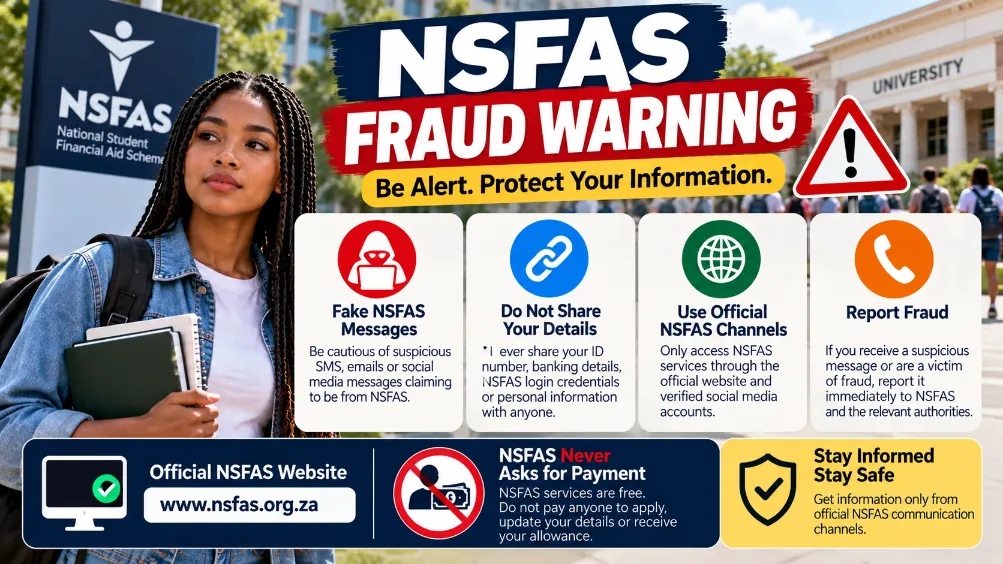
NSFAS Will Never Ask for Your Password or OTP
Your myNSFAS password and OTP should stay private. Students should never send these details to another person through WhatsApp, email, SMS, social media, or a phone call.
An OTP can provide access to an account or help confirm an account action. Sharing it can therefore expose your account to misuse.
| Request | Safe action |
|---|---|
| myNSFAS password | Do not share it |
| One-time PIN | Do not share it |
| Application payment | Do not pay |
| Fee for faster approval | Do not pay |
| Payment to change a decision | Do not pay |
| Unknown login link | Do not open it |
| Unverified banking request | Stop and verify it |
How to Spot a Fake NSFAS Message
A suspicious message can contain several warning signs. Check the sender, website address, wording, and request before responding.
Look for:
- Strange website addresses
- Misspelled domains
- Requests for passwords
- Requests for OTPs
- Urgent payment demands
- Promises of guaranteed funding
- Requests for personal information through social media
- Claims that an employee can change a funding result
- Requests to send money to a personal bank account
- Links that do not lead to the official NSFAS website
Students should use the official NSFAS website and myNSFAS platform for online services. Typing the official website address directly into the browser can reduce the risk of landing on a fake login page.
Fake NSFAS Agents and Paid Application Services
Some scammers present themselves as NSFAS agents and offer to submit applications for a fee. Paying such a person does not provide a better chance of receiving funding.
NSFAS applications are free. Students do not need to pay an outside person for an application submission.
Students can use official NSFAS support channels for assistance instead of giving money or personal information to an unknown agent.
Be Careful With NSFAS Banking Scams
Banking information requires extra care. Scammers may try to obtain account details or convince students to redirect allowance payments.
NSFAS has provided banking guidance for beneficiaries and states that students should submit their own banking information through the proper NSFAS process.
Important points:
- Keep banking details private.
- Do not provide account information to an unknown person.
- Check banking information through your myNSFAS account.
- Avoid banking instructions received from an unverified social media account.
- Contact your bank after suspected misuse of banking details.
- Keep records of suspicious messages and payment requests.
Fake NSFAS Websites
Fake websites can look similar to government or education websites. A page may use an NSFAS logo and still be fraudulent.
Before entering your login details:
- Check the complete website address.
- Look carefully at the domain spelling.
- Avoid links sent by unknown accounts.
- Open the official NSFAS website directly.
- Do not enter your password on an unverified page.
- Never enter an OTP into a suspicious website.
A genuine-looking design does not prove that a website belongs to NSFAS.
NSFAS Social Media Scams
Social media provides another route for fraud. A scammer may copy NSFAS branding, use a similar profile name, or claim to have direct access to funding decisions.
Do not assume that a social media account belongs to NSFAS simply because it uses the organisation’s logo.
Students should check official NSFAS communication channels before responding to a social media account that requests money or personal details.
What to Do After Receiving a Suspicious NSFAS Message
Do not reply with sensitive information or send money. Save the message and verify the claim through an official NSFAS channel.
Follow these steps:
- Stop communicating with the suspicious account.
- Do not open unknown links.
- Do not send an OTP or password.
- Do not transfer money.
- Take screenshots of the message or profile.
- Check your myNSFAS account directly.
- Contact NSFAS through its official support channels.
- Report suspected fraud or corruption.
NSFAS provides an ethics and fraud reporting channel for suspected fraud and corruption.
How NSFAS Fraud Can Affect Students
A scam can cause financial and account-related problems. Sharing account information may also expose personal details.
Possible consequences can include:
- Loss of money
- Unauthorised account access
- Exposure of personal information
- Compromised banking details
- Delays caused by incorrect information
- Loss of control over an online account
- Further scam attempts
A student should report suspected account or banking misuse as soon as possible.
NSFAS Scam Warning Signs at a Glance
| Warning sign | Reason for caution |
|---|---|
| Application fee | NSFAS applications are free |
| Guaranteed funding | Funding cannot be purchased |
| Password request | Passwords should remain private |
| OTP request | OTPs should not be shared |
| Urgent payment demand | Pressure can lead to rushed decisions |
| Unknown login page | It may capture account details |
| Personal bank account request | The payment request may be fraudulent |
| Fake social media profile | Branding alone does not prove authenticity |
| Paid appeal service | Verify support through NSFAS |
| Unverified agent | Check the person’s claim through official channels |
Protect Your NSFAS Account
Good account security can reduce the risk of fraud.
Students should:
- Use a strong password for their myNSFAS account.
- Keep the password private.
- Never share OTPs.
- Avoid saving login details on shared computers.
- Check the website address before signing in.
- Use official NSFAS communication channels.
- Keep contact details updated.
- Review suspicious messages carefully.
- Report suspected fraud.
Students should also avoid using the same password for multiple important accounts.
NSFAS Fraud Warning for Allowance Payments
Allowance scams may appear as messages claiming that a student needs to pay a release fee before receiving money. Such requests require immediate caution.
NSFAS states that students do not need to pay a fee to receive an allowance.
For students using the NSFAS direct payment process, banking details should be submitted through the proper NSFAS procedure. A stranger should never control the student’s banking information or request payment in exchange for releasing an allowance.
What to Do if You Already Shared Your Details
Act promptly after sending sensitive information to a suspicious person.
For a password: change the password through the proper account process. Avoid using the same password on other accounts.
For an OTP: contact NSFAS and check your account for suspicious activity.
For banking information: contact your bank immediately and explain the situation.
For a payment: keep the payment receipt, recipient information, and related messages. Report the suspected fraud through the appropriate channels.
For personal documents: keep records of the communication and report the incident through an appropriate official channel.
NSFAS Scam Safety Checklist
Before responding to any NSFAS-related message, check these points:
- Is the person asking for money?
- Are they promising guaranteed funding?
- Are they asking for your password?
- Are they requesting an OTP?
- Does the website address look correct?
- Did the message arrive through an official NSFAS channel?
- Are you being pressured to act immediately?
- Can the request be verified through NSFAS?
A request for payment, a password, or an OTP deserves extra caution. NSFAS applications are free, and students should keep account security information private.
Students can report suspected fraud or corruption through the official NSFAS fraud reporting channel and use official NSFAS support channels for application, account, and allowance assistance.

- NSFAS Fraud Warning: How to Spot NSFAS Scams - September 28, 2026
- NSFAS Allowances Explained - September 28, 2026
- NSFAS Contact Details - September 26, 2026