
How to Reset myNSFAS Password
Resetting your myNSFAS Portal password is quick and simple. Whether you forgot your login details or want to secure your account, NSFAS allows students to reset their passwords online in just a few minutes. This process helps you regain access to your student funding profile, NSFAS application status, and payment updates without visiting an office.
Why Resetting Your myNSFAS Password Matters
Your myNSFAS account is your gateway to everything related to financial aid in South Africa. Without access, you can’t view your funding progress, submit documents, or confirm allowances. That’s why it’s important to Set Up Your myNSFAS Login correctly, so you can manage your account smoothly and stay updated on your financial aid status.
Key Benefits:
-
Maintain continuous access to your funding information.
-
Prevent missed application deadlines or payment delays.
-
Protect your account from unauthorized access.
-
Update personal details securely through verified login.
Step-by-Step Guide to Reset myNSFAS Password (2026 Update)
Follow this easy step-by-step process to reset your NSFAS password online:
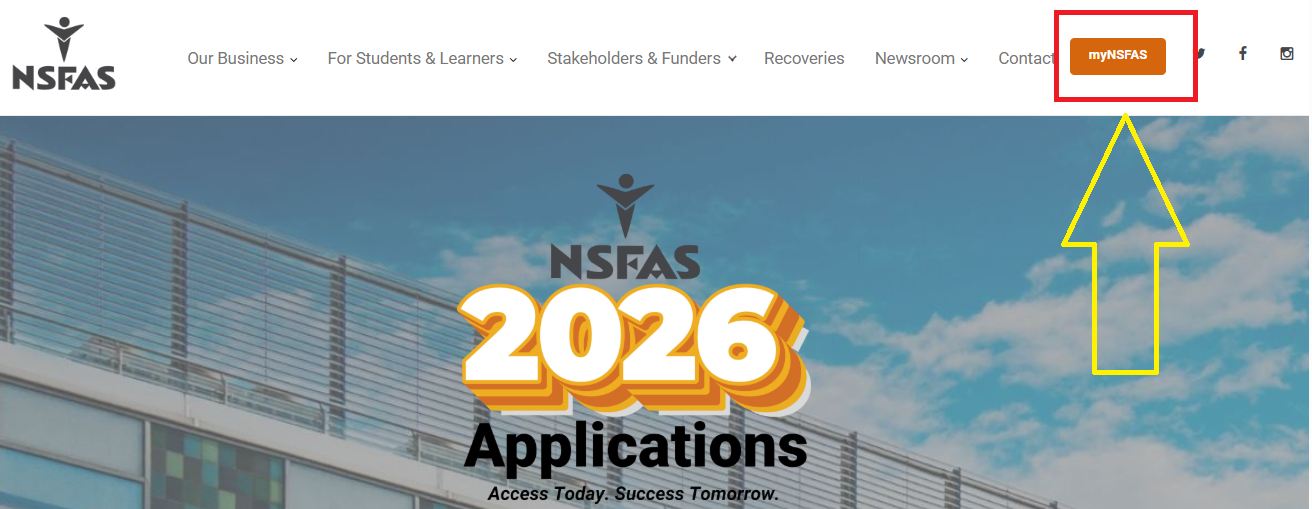
- Visit the official NSFAS website.
- Select myNSFAS from the website.
- Click Forgot Password.
- Enter your South African ID number in the required field.
- Select Password from the available help options.
- Click Submit.
- NSFAS will send your username and a password-reset link through SMS and email.
- Open the link received from NSFAS.
- The link will take you to the password reset page.
- Follow the instructions shown on the screen and create your new password.
- Return to the myNSFAS login page and sign in using your updated details.
Information Needed for a Password Reset
You do not need to create a new myNSFAS profile just because you forgot your password. The self-service process uses details already connected to your account.
| Information | Purpose |
|---|---|
| South African ID number | Identifies your myNSFAS profile |
| Registered cellphone number | Receives account messages |
| Registered email address | Receives the password-reset link |
| myNSFAS username | Used to access your account |
| New password | Gives you access after the reset |
NSFAS advises students to use their own cellphone number and email address for their accounts.
How to Reset myNSFAS Password Using Your Phone
If you don’t have a laptop or desktop, don’t worry, you can reset your myNSFAS password directly on your smartphone.
-
Open your browser (Chrome, Safari, or Opera Mini).
-
Visit my.nsfas.org.za.
-
Tap “Forgot Password.”
-
Enter your ID number and follow the same on-screen instructions.
-
Check your SMS or email for the reset link.
-
Create your new password and log in again.
Reset myNSFAS Password Without Email Access
If you no longer have access to your registered email, don’t panic. NSFAS provides alternative recovery methods.
Here’s what you can do:
-
Use your registered cellphone number to get the reset link.
-
If both your email and number are inaccessible, contact NSFAS support directly.
-
Visit a nearby NSFAS office or TVET financial aid office with your ID for manual verification.
Common myNSFAS Password Reset Errors (and Fixes)
During the reset process, you may face certain issues. Below is a list of common problems and their solutions:
| Problem | Cause | Solution |
|---|---|---|
| Reset link expired | The link was not used within the given time. | Request a new reset link. |
| Email not received | Wrong email or message in spam. | Check the junk folder or verify your registered email. |
| Invalid ID error | Incorrect ID format entered. | Recheck and type your ID number correctly. |
| Account locked | Too many failed login attempts. | Wait 30 minutes or contact NSFAS support. |
| Link not opening | Using an outdated browser. | Try Chrome or Firefox for the best results. |
How to Keep Your myNSFAS Account Secure
Once your password is reset, it’s important to keep your account protected. Follow these basic digital safety rules:
Security Tips:
-
Use a unique password that includes letters, numbers, and symbols.
-
Avoid sharing your login details with friends or online agents.
-
Update your contact info regularly on your myNSFAS profile.
-
Don’t use public Wi-Fi for financial transactions.
-
Change your password every few months for better security.
myNSFAS Password Reset Link — Official Source
There are many fake websites that imitate the NSFAS portal. Always make sure you use the official link to avoid scams.
Official Websites and Links:
-
✅ Main portal: my.nsfas.org.za
-
❌ Avoid any sites with extra words like “myNSFAS-help” or “NSFAS-login-fix.”
-
NSFAS will never send you a link via WhatsApp or ask for your password.
Always verify URLs before entering your personal details.
myNSFAS Support Contacts (2026)
If you still can’t reset your password, NSFAS offers multiple contact options for assistance.
| Support Type | Details |
|---|---|
| Toll-Free Number | 0800 067 327 |
| info@nsfas.org.za | |
| Twitter (X) | @myNSFAS |
| NSFAS Official Page | |
| Website | www.nsfas.org.za |
Why You Might Not Receive the NSFAS Password Reset Email
Sometimes, the password reset link doesn’t show up in your inbox. Here’s why that happens and how to fix it:
-
The email went to spam or junk.
-
You entered the wrong email or misspelled it.
-
Your email provider (like Yahoo or Gmail) temporarily delayed messages.
-
Your NSFAS profile was registered with a different email.
Solution: Double-check your registration details and request another reset link.
How to Update Your myNSFAS Contact Information
If you’ve changed your email or phone number, update them to avoid future password issues.
To update your contact info:
-
Log in to your myNSFAS account.
-
Go to “My Personal Details.”
-
Click “Edit” next to email or phone number.
-
Save the new details and confirm via verification code.
How to Reset myNSFAS Password Without ID
If you lost your ID card but still need to reset your password, note that NSFAS requires identity verification for security purposes. However, you can:
-
Visit a TVET financial aid office with a certified copy of your ID.
-
Provide your NSFAS reference number to confirm your identity.
-
Once verified, NSFAS staff can assist with password recovery.
How to Recover a Locked myNSFAS Account
If you’ve tried too many times and your account is locked, here’s how to fix it quickly:
-
Wait for 30 minutes before trying again.
-
Use the “Forgot Password” option to reset instead of guessing.
-
If it remains locked, contact info@nsfas.org.za for manual unlocking.
Do’s and Don’ts After Password Reset
| Do’s | Don’ts |
|---|---|
| Use a strong new password. | Don’t reuse your old password. |
| Confirm that you can log in again. | Don’t ignore the confirmation email. |
| Keep your contact info updated. | Don’t share your password online. |
| Logout from shared devices. | Don’t click on unverified links. |
Resetting your myNSFAS password is one of the simplest ways to secure your student account and maintain full access to funding updates. With the 2026 online reset system, you no longer need to visit an office or fill out paperwork. Just follow the official process, use a verified email or phone number, and keep your details up to date for a smoother experience.
FAQs
How long does it take to reset myNSFAS password?
Usually within a few minutes after you receive the reset link.
Can I reset my password without my ID number?
No, your ID number is required to verify your account.
Why am I not receiving my reset link?
Check your spam folder or confirm your registered email. You can also request another link.
What if I forgot both my email and phone number?
You will need to visit an NSFAS or TVET office for identity verification.
Can I change my NSFAS password anytime?
Yes. Log in and go to Account Settings → Change Password.
What should I do if my reset link expired?
Request a new one by repeating the password reset process.
Can I use the same password across different platforms?
No. It’s better to use a unique password to enhance security.
Will NSFAS ever ask for my password by phone?
Never. Any such request is a scam, only reset through the official website.
Can I use a temporary email to reset my password?
No. Always use your registered email to maintain account security.
What should I do after resetting my password?
Try logging in immediately and update your contact info if necessary.

- NSFAS Fraud Warning: How to Spot NSFAS Scams - September 28, 2026
- NSFAS Allowances Explained - September 28, 2026
- NSFAS Contact Details - September 26, 2026